বৃহস্পতিবার, ২৬ এপ্রিল, ২০১২

New iPad (3rd-Gen) Battery Allegedly Not Fully Charged At 100% Mark

Those owning a tablet or a smartphone could vouch, you spend about as much time keeping tabs on the battery percentage reduction than you do enjoying many of the great features.
Battery retention is an oft-overlooked aspect to prospective consumers, usually courted by slick advertising and mind-blowing specs, but without a decent battery – as some iPhone 4S users discovered – your device is next to useless.
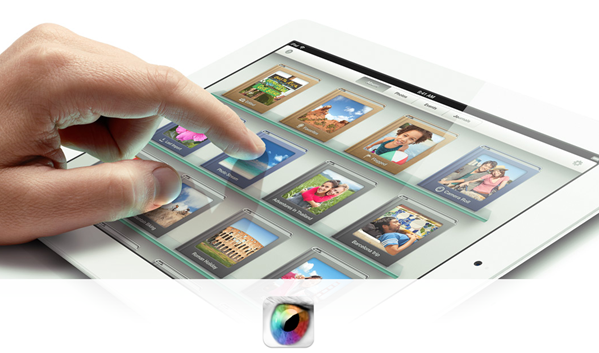
Having stepped up its hardware game in the new iPad with LTE, Retina display and an A5X processor capable of quad-core graphics, Apple had to commit what it would probably consider to be a cardinal sin in increasing the depth of its latest and greatest tablet device. The new inhabitants – particularly the 4G chip – guzzle battery like a thirsty camel, so Apple had to sacrifice it’s thinner and lighter motif in order to lay on the much-improved iPad to expectant consumers.
Dr. Raymond M. Soneira, creator of DisplayMate, has written a report on the 3rd-gen iPad, and reckons the new battery continues charging a great deal of time after iOS displays that lovely ’100%’ statement of completion in the top-right corner. He goes on to urge iPad users looking to get the most juice as possible into their new tablet to continue charging for up to an hour after it shows as 100 percent.
Speaking with ArsTechnica via e-mail, Soneira noted that after measuring the power actually drawn by the AC Adapter, he discovered:
"The new iPad continues to charge for up to 1 hour after it claims to reach 100 percent. This affects the battery run time if you stop charging when it says 100 percent. Other tablets and smartphones also lie about their charging status, so if getting maximum battery run time is crucial, people need to keep their devices recharging for longer than the screen claims."
So, folks, as well as keeping brightness down to the minimum feasible, slipping into Airplane mode wherever possible and only allowing your device to push through necessary notifications, you can also add "over charge by one hour" to the list of things to preserve the precious droplets of gas in the tank.
Let us know how much it improves the longevity of your device, by dropping a comment via the usual mediums below.

Next iPhone Arriving This Fall With 4G LTE, Will Reportedly Feature Same 3.5-inch Display

It seems that the better devices get, the more demanding consumers become. Barely a week has passed since the release of the new iPad, and yet already it seems much of the blogosphere is focusing its attention on the next iPhone.
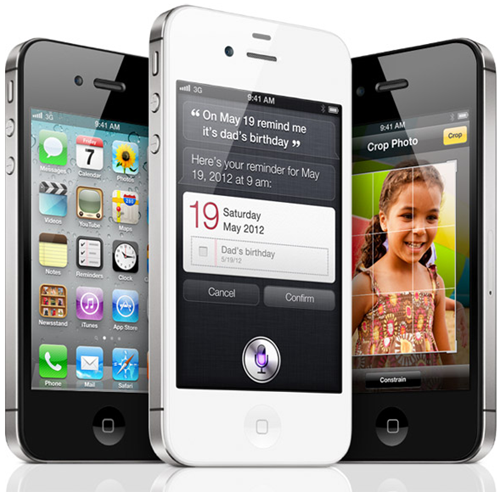
Indeed, iPad aside, we’ve only had the pleasure of Siri and the iPhone 4S for some five months, yet there has been an underlying notion of "this is great, but what’s next?" ever since the release date.
It was initially suspected the next iPhone would be 4G LTE compliant, a suspicion which seemed even likelier to materialize with the new iPad supporting 4G. Yesterday, the discovery of strings within iOS 5.1 gave us as sure an indication of a 4G iPhone as we could get without actually hearing it from Apple officially.
More details have now emerged, with iMore reckoning Apple will stick with the current 3.5-inch screen size. A few interesting theories have cropped up hitherto, offering supposed reasons as to why the fruit company has stuck with the same screen size for nearly five years, while rivals’ displays have gotten progressively larger. Designer Dustin Curtis believed that since the average thumb couldn’t cover a diameter much larger than 3.5-inch, Apple wouldn’t go any larger. However, we’ve also been hearing that Apple will go higher – all the way up to 4.6-inches in fact, so the jury remains out on whether Tim Cook’s company will finally break the mold.
October 2012 seems to be the perceived release frame – not too much of a surprise since the iPhone 4S released last October. Apple reaped the benefits of the holiday shoppers last year with exceptional sales, so will be unlikely to revert its release cycle back to the summer, which some reports have claimed.
Moreover, since Apple’s iPhone 3GS was still retailing (and selling well) up until last October, it’s clear that the iPhone can withstand the test of time. Thus, Apple will not want to shorten the iPhone 4S’s shelf life by releasing a new one any earlier than a year later.
As well as the similar-sized screen and 4G LTE radio, iMore reckons the device will come with a "micro" dock connector, which will make the plug and socket smaller and in turn free up space inside the device for hardware. It will not compromise any data or transfer speed, and will be a similar introduction to the space-saving Micro SIM tray within the iPhone 4.

How To Use Siri To Give You Detailed And Real-Time Battery Information Of Your iPhone

When you consider all of the fantastic and powerful features that the iPhone has, you quickly come to realize that it is a fairly fantastic piece of consumer technology. The latest in the series, the iPhone 4S not only has an amazing Retina display and an 8 mega-pixel camera, but it also has an awesome built-in intelligent voice assistant. We are living in a generation where consumers constantly demand more and more from manufacturers, but it is sometimes worth stopping for a moment and considering the intense technology which we already have.

With that said, I for one am not going to complain if Apple keep on pumping impressive features into their smartphones, and will certainly relish in the fusion of Apple hardware and software mixed with the enhancements and modifications that the jailbreak community keeps pumping out. The birth of the iPhone 4S gave developers the bug for developing tweaks and extensions for Siri, but it wasn’t until the Absinthe jailbreak was released for A5 devices in January that we really started to see Cydia getting flooded with tons and tons of amazing tweaks and enhancements.
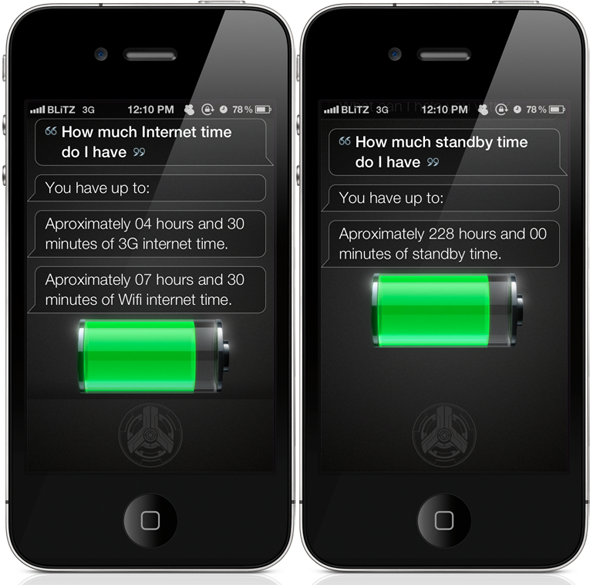
Cydia packages are sometimes a hit and miss affair, and that has certainly been the case when it comes to Siri-based tweaks. Some of them have proved to be extremely useful, such as the ones that allow system settings to be easily manipulated. However, others fall under the “just because you can, doesn’t mean you should” category and would have probably been left on the developer’s hard drive. The BatteryLevelAE tweak falls into the useful category, as it uses Siri to provide pretty accurate battery life statistics, which we all know can come in very handy when running iOS 5 due to the terrible battery life users have been suffering

BatteryLevelAE is another package that is built upon the AssistantExtensions tweak and therefore will install AE as a dependency if it is not already on the device. AssistantExtensions is obviously a very handy little framework for Siri developers to use, but I happen to have a gripe with it due to the fact that it sometimes places ads on the Siri GUI when the assistant is invoked, something that is a big no for me. That shouldn’t detract from the usefulness of BatteryLevelAE which provides comprehensive battery information through the use of simple voice commands such as “how much talk time do I have left?” and “how much audio time do I have left?”.
The full command menu can also be invoked by saying “battery help menu”, prompting Siri to display a full list of possible commands on the display. Considering the ongoing battery problems which users have been experiencing with builds of iOS 5 prior to 5.1, BatteryLevelAE would seem like a very intelligent purchase to keep track of potentially imminent power failure. BatteryLevelAE is available from the BigBoss repository at a cost of $0.99 and requires a Siri compatible device with iOS 5 installed.
Of course, you will need to jailbreak your device to install this tweak. For jailbreaking the latest iOS 5.1 (tethered), follow the instructions posted here to jailbreak using Redsn0w, or here for Sn0wbreeze. For jailbreaking iPhone 4S and iPad 2, you can simply follow our step by step tutorial posted here to jailbreak iOS 5.0.1 using Absinthe on Windows or Mac. Those of you with an iPhone 4, 3GS, iPad 1, and iPod touches can use Redsn0w or Sn0wbreeze to untether jailbreak on iOS 5.0.1.
(via CultOfMac)
Be sure to check out our iPhone Apps Gallery and iPad Apps Gallery to explore more apps for your iPhone, iPad and iPod touch.

Ultra Wide HD LWP For Android: Set Wallpapers Of Any Size Without Cropping, Apply Effects/Borders/Overlays And More!

One very small area where Android could take a lot of improvement is its wallpaper cropping tool. For most people, this isn’t really an issue, but with enthusiast folk who like to work on every fine detail of their homescreen setup, a good wallpaper is considered to be one of its integral parts.
Now, if the built-in wallpaper cropping tool doesn’t work, what do you do? On iOS, you would be stuck with it forever (unless you jailbreak and there’s a relevant tweak on Cydia). On Android, you look for third-party alternatives and we came across one today. It’s called Ultra Wide HD LWP and you can check it after the jump!
Developed by lithium76 from popular Android development forums XDA-Developers, Ultra Wide HD LWP is a powerful wallpaper editing tool that lets you use a image as a wallpaper that way you want it, not inhibited by any of Android’s built-in wallpaper-selection tool’s limitations.
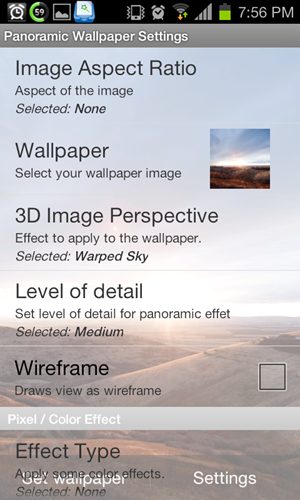
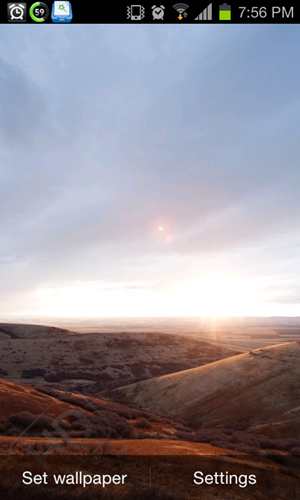
When you launch Ultra Wide HD LWP, it takes you straight to Android’s Live Wallpaper menu from where you have to select Ultra Wide HD. From here, you can jump into settings from where you can edit the selected image’s aspect ratio, its level of detail, a wireframe, the type of effect to apply to it (think Instagram-type filters) and select an overlay to name a few things. Once you’re done, you press the Back button on your and then tap Set Wallpaper to do the deed


Ultra Wide HD LWP comes in “Lite” [Play Link] and paid [Play Link] versions. As you can guess from the name, the Lite version comes with limited versions and applies an “HD” watermark to your wallpaper whereas the paid version comes with all features and without watermarks.
We previously covered an app called Wallpaper Wizardrii that basically had the same intention behind it (to be a better wallpaper selection/editing tool), but in our time with both it and Ultra Wide HD LWP, we found Ultra Wide HD LWP to be the app for the simple reason that it is a whole lot easier to understand and use.
Be sure to check out our Android Apps gallery to explore more apps for your Android device.

The New iPad Is Magical, When Given To Two Magicians [VIDEO]

We love a good magic show here at Redmond Pie, and if anyone can somehow manage to incorporate some technology into a magic act then we’re particularly interested. Magic and technology, a match made in heaven. We have been treated to just that a few times since the iPad arrived, but this might just be the best we’ve encountered yet.
The iPad has been called a lot of names since its initial release back in 2010. Much fun has been poked at Apple for its incessant use of superlatives when describing its devices, and the iPad has been the biggest beneficiary of such exaggeration.
Those who have been paying attention over the last few years will no doubt remember Apple calling the iPad ‘magical and revolutionary.’ Few would argue against the iPad being revolutionary, but is magical not perhaps getting a little carried away?
As this video shows, Apple may actually have been on to something!
We have seen magicians use the iPad as a prop a few times before, and some of the same tricks have found their way into this performance too, but we have to admit that this is possibly the most impressive video we have seen to date, and we’re sure you will agree.
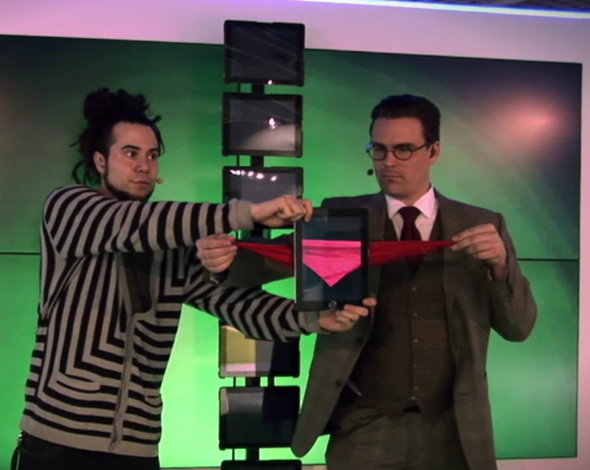
The performance by Step2 Communication at MIPIM in Cannes included no less than seven different iPads to pull off, and spans over three minutes of impressive Apple-powered magic.
We can only speculate about how much practice and preparation this presentation took in order to get spot on, but all we can do is hold our hands up and offer a hearty "well done" to those involved. Color us impressed.
We really have to admit; these magicians (or tricksters) pulled off an amazing feat with all those iPads in the background. I can’t emphasize more on the fact that we’re all dearly impressed.
On a semi-related note, has anyone ever wondered why nobody ever seems to use an Android tablet for these performances? Or perhaps a nice BlackBerry PlayBook?
Someone buying a BlackBerry PlayBook… Now that really would be magical.
(via iMore)
You may also like to check out:

Developer Finds A Way To Downgrade iOS 5.1 To iOS 5.0.1 On iPad 2 And iPhone 4S

H8sn0w, the well known iOS developer and researcher who is responsible for the production of Sn0wbreeze, iFaith, iReb and f0recast has been hard at work again trying to resolve an issue that has been tainting the experience of owners of the iPhone 4S and iPad 2. The said two Apple devices are powered by the A5 processor, and as any jailbreak fan will know, it hasn’t previously been possible to perform firmware downgrades on those two units. When Apple releases a new version of iOS, they promptly stop signing the older firmware, meaning that any official restores result in the user installing the latest official iOS version onto their device.
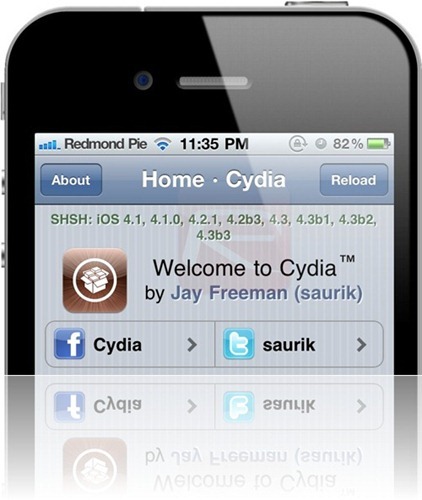
In normal circumstances, going to the latest version of iOS isn’t really a big issue for standard users. However, the problem occurs when iDevice owners who wish to perform a jailbreak update their software, leaving them having to sit and wait patiently until the Dev-Teams produce a working, distributable jailbreak for that new iOS version. On older devices, users can benefit from a firmware downgrade to versions of iOS that Apple no longer signs as long as they have the relevant SHSH blobs saved for that firmware. In most cases, Cydia automatically captures any available blobs and update the users’ Cydia app with the blobs that have been saved. Jailbreak fans also use the very popular and powerful TinyUmbrella tool to quickly and efficiently capture available SHSH blobs and save them locally on their machines for use at a later date.
Although we have had the iPad 2 since March 2011, and the iPhone 4S since October, there hasn’t been a method available to allow users to downgrade these A5 powered devices which means that a restore is required for any reason that the latest firmware version would be installed. Canadian based iOS developer and hacker iH8sn0w claims to have found a loophole in Apple’s APTicket system that allowed him to successfully downgrade his iPad 2 from iOS 5.1 to 5.0.1. The good news is that he also believe that the loophole he has found will also allow firmware downgrades on Apple’s new iPad running on the new A5X processor. Obviously this will only be possible when newer firmwares become available due to the fact that all new iPads were actually shipped with iOS 5.1, which is the current version.
The news basically means that owners of the iPad 2, the new iPad and the iPhone 4S have finally been invited to the downgrade party and will be able to restore their devices to any firmware of their choice, providing that they have the relevant SHSH blobs saved. Other than a tweet from iH8sn0w about the APTicket system loophole, we have no additional information from the developer, but as it filters through we will be sure to bring it to you.
You may also like to check out:

iOS 5.1 For iPhone, iPad And iPod touch Sees Impressive Adoption Amongst Users

According to new figures released by an iOS app developer, iOS 5.1 has seen huge growth amongst owners of iPhones, iPads and iPod touches, bringing a large percentage of devices up to the latest version of iOS within just two weeks.
Apple always prides itself in the speed at which its new software updates find their way onto the devices of iPhone and iPad owners across the globe. Getting users to upgrade to the latest and greatest versions of iOS is something that is not only important for Apple itself, but for the thousands of app developers that rely on users migrating to versions of iOS with new APIs and features built in, too.
The latest version of iOS is version number 5.1, with bug fixes and security updates being the order of the day. With no major updates arriving this time around, it is perhaps surprising that iOS 5.1 has seen such stellar uptake amongst iOS device owners.
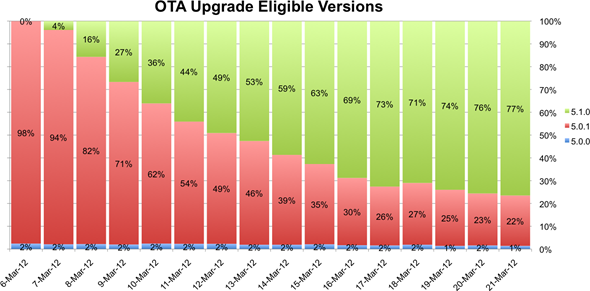
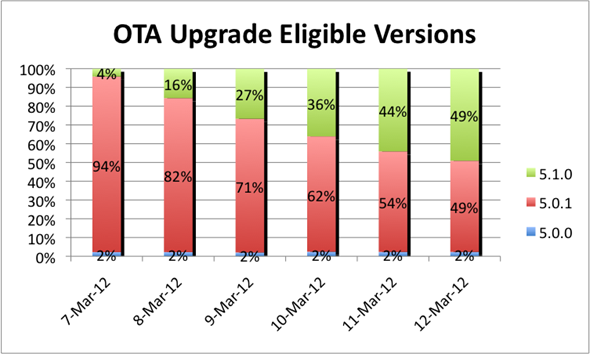
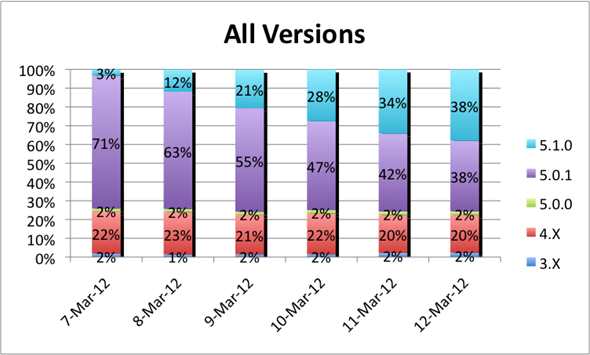
Developer David Smith has been tracking the versions of iOS that users of his Audiobooks app are running on their devices, and he speculated that the new over-the-air update system may cause an increase in update over previous releases which required devices to be plugged into iTunes for updates.


Released on March 7th, iOS 5.1 has seen phenomenal update figures, with 50% of those eligible to use the OTA update system having already taken the plunge. After just over two weeks, that number had risen to an impressive 77%.
It had long been suspected that those users who are still stuck on old releases of iOS had been reluctant to update because either they didn’t want to plug their cherished iOS device with iTunes, or they simply didn’t know an update was available. With the new over-the-air updates prompting users to update when new versions are made available, those who do not keep up to date with the technology scene will be pushed to update whereas before they may never have known they could.
 Over-the-air updates were added to iOS in version 5.0, and have been used for both the iOS 5.0.1 and 5.1 updates since. Allowing users to update their devices without the need for a cable or a computer, OTA updates make updating our iOS devices easier than ever.