বৃহস্পতিবার, ২৬ এপ্রিল, ২০১২

WeeSearch Pro For iPhone: Search Multiple Locations On The Web Directly From iOS 5 Notification Center

If internet users actually took a few minutes to sit back and take stock of the amount of information they extract from the world wide web on a daily basis I think they might actually be a little taken aback. The majority of individuals use the internet to learn and acquire information as well as seeking out and watching videos of cute puppies on YouTube. With sites like YouTube and Vimeo, search engine giants such as Google and free information hubs like Wikipedia; the internet really does have something for everyone and it is a very rare instance that you can’t find an answer to something you are looking for.
For those who are always connected to a desktop or a notebook, quickly flicking between different search engines provides little fuss and can be done quite easily. However, the current boom in the smartphone and tablet industry means that more and more users are turning to their mobile devices throughout the day as their main access to the internet and all of the information it holds. Once upon a time, mobile users were limited to websites which had been specifically formatted to be used on WAP-enabled devices, thankfully this is no longer the case.
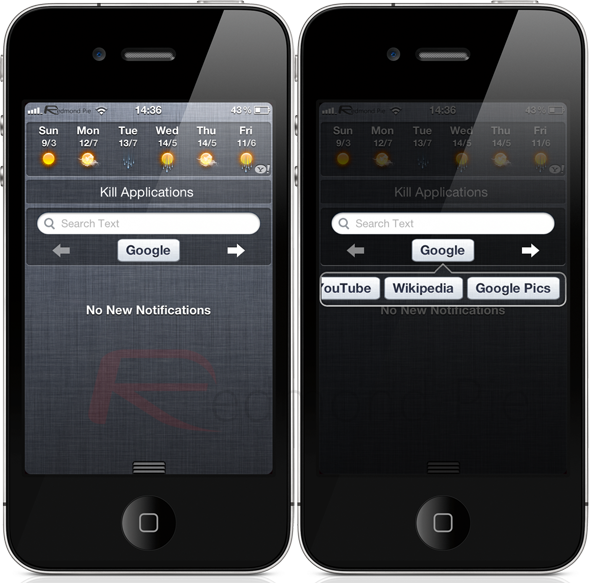
Owners of an iPhone happen to also be benefitting from a jailbreak now have the option of downloading the WeeSearch Pro plugin by Jonas Gessner, who some may know from his Currency Converter or ProTube enhancements that can be found in Cydia. WeeSearch Pro is a Notification Center based tweak which, when activated provides users with a dedicated NC-based hub for all things search related. When activated, WeeSearch Pro puts a simple search bar into Notification Center, along with a handy selection of pre-defined sites to search for information on. The plugin comes with the ability to search through Google, YouTube, Wikipedia, Amazon, eBay, Wolfram Alpha, Yahoo, Bing and Google Pics which I would imagine would cater for the majority of people’s searching requirements.
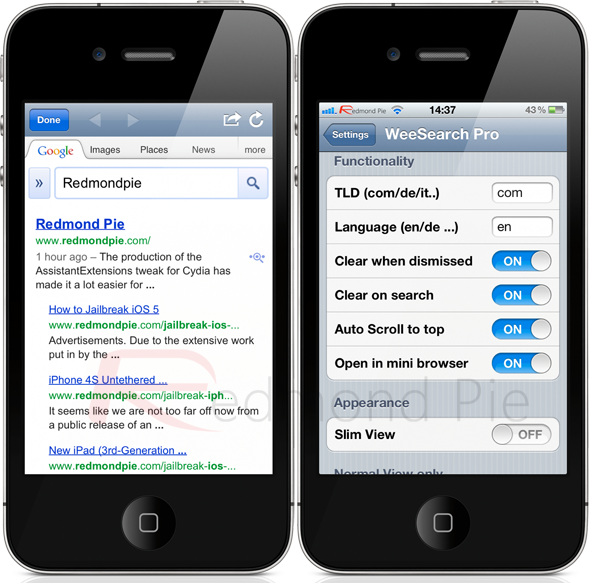
If that isn’t enough, WeeSearch Pro does offer the ability to enter a user-defined search engine which can be added through the ‘Manage Search Engines’ option in the preferences section of iOS. WeeSearch Pro also comes with quite a substantial set of configurable options which allow users to change how the tweak behaves as well as the aesthetics of it within Notification Center. One of the coolest features of the tweak is the addition of a very simple overlaid web view which appears through a page curled animation when the search button is pressed. This new view allows the results to be viewed before deciding whether to continue and open the results in Mobile Safari or dismiss and return to Notification Center
WeeSearch Pro is available from the BigBoss repository for $1.49 and requires iOS 5 or above. An additional back up utility is also available as a free of charge download which allows user-defined search engines to be backed up and easily recalled at a later date.
Of course, you will need to jailbreak your device to install this tweak. For jailbreaking the latest iOS 5.1 (tethered), follow the instructions posted here to jailbreak using Redsn0w, or here for Sn0wbreeze. For jailbreaking iPhone 4S and iPad 2, you can simply follow our step by step tutorial posted here to jailbreak iOS 5.0.1 using Absinthe on Windows or Mac. Those of you with an iPhone 4, 3GS, iPad 1, and iPod touches can use Redsn0w or Sn0wbreeze to untether jailbreak on iOS 5.0.1.
Be sure to check out our iPhone Apps Gallery and iPad Apps Gallery to explore more apps for your iPhone, iPad and iPod touch.

Skype For iPad Updated With Retina Display Graphics, Makes Us Wish The New iPad Had An HD FaceTime Camera

Skype, the popular VoIP communications software, has just updated its iPad app, improving visual quality for those using the new Retina display.
When it comes to keeping in touch with those far and wide, Skype is undoubtedly the number one choice, allowing voice calls for very competitive prices. Skype was probably the first company to capitalize on internet connections for voice chat, and is partly responsible for the shift from traditional telephone line calls – which can often be extortionately expensive.

2011 was the year of the big acquisitions, and Redmond-based Microsoft moved in for Skype last summer for an eye-watering 12.5 million dollars – much to the surprise of many analysts.
Microsoft has subsequently sought to implement the online telecommunications software and technology wherever possible, including mobile and Xbox LIVE. With Windows 8 quite publicly being prepared for release later this year, it is of vital importance that Skype is utilized to the maximum, enabling Steve Ballmer’s company to recoup some of that hefty investment.

Keeping the iPad app up-to-date is certainly a step in the right direction. Having shifted three million in the first weekend alone, it seems consumers are rushing to get their paws on the new device, which as well as a Retina display, includes quad-core graphics, a brand-new, 5-megapixel camera, and, of course, 4G LTE technology.
A native Skype app seemed to take an age to land on Apple’s market-leading tablet, having finally been released last August. With video calling over Wi-Fi and 3G, it certainly trumps Apple’s own FaceTime in terms of options, since it – despite now retailing an iPad with 4G – does not allow FaceTime video calling over cellular connection.
The latest version requires iOS 4 and up, although release notes recommend running the latest and greatest iOS 5+ for the very best Skype experience.

This appears to merely be a cosmetic update, so aside from the Retina tweaks, there are no other changes noted, but this update really makes us wish that the new 3rd-gen iPad had a front facing HD camera instead of VGA one; however if you stumble across any new features or indeed any bugs, please share them via the comments section on Facebook or Google+.
Download Skype for iPad [iTunes Link]
Check out our iPhone Apps Gallery and iPad Apps Gallery to explore more apps for your iPhone, iPad and iPod touch.
CmdTab For iOS Brings The OS X Command+Tab App Switcher Method To Jailbroken iOS Devices


Users of a Mac, or even a Windows-based PC, will be aware of the fact that you can flick between running apps by using the command/Alt and Tab buttons together. A quick press of these two buttons will flick to the last viewed app and back again. However, if you hold the buttons down together, a nice little view is overlaid on the screen which shows all of the running apps and allows the user to toggle between them all and choose one quickly. An iOS developer known as coffeejayyy has decided to make an iOS implementation of that feature and has called it CmdTab, available in Cydia now.
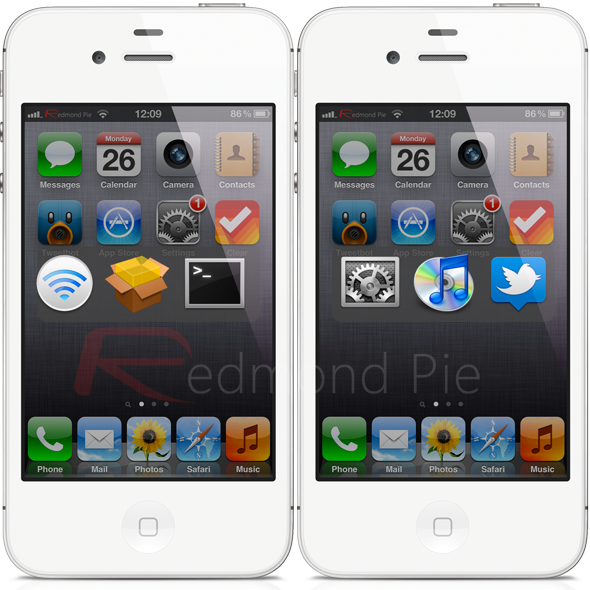
CmdTab for iOS works via an Activator gesture, which when invoked brings up a very similar overlay on the screen with the difference being that CmdTab doesn’t show a list of running apps but instead has a number of hard-coded shortcuts. The shortcuts included allows you to compose a text message, access Wi-Fi settings, open up the default Twitter app, launch Cydia and launch the Music app on the device. The view can be dismissed by pressing the Home button and leaves elegantly with a nice animation.


All in all, CmdTab is a nice little implementation of the Mac OS X feature, but it falls down in a couple of places for me. To be a true implementation; I would require it to effectively rework the iOS multitasking and display the apps which are currently backgrounded. The developer has chosen to not make the CmdTab tweak about multitasking, but instead about quick launching certain things on the device, which in itself is fine. However, the tweak would be a lot more powerful if it came with a settings option, allowing users to choose their own shortcuts rather than have to live with the developer’s choices. With that said, CmdTab is a very polished and pretty tweak and considering it is free of charge, is definitely worth a look.
CmdTab is available as a free of charge download from the ModMyi repository and lists no particular device or software requirements.
Of course, you will need to jailbreak your device to install this tweak. For jailbreaking the latest iOS 5.1 (tethered), follow the instructions posted here to jailbreak using Redsn0w, or here for Sn0wbreeze. For jailbreaking iPhone 4S and iPad 2, you can simply follow our step by step tutorial posted here to jailbreak iOS 5.0.1 using Absinthe on Windows or Mac. Those of you with an iPhone 4, 3GS, iPad 1, and iPod touches can use Redsn0w or Sn0wbreeze to untether jailbreak on iOS 5.0.1.
Be sure to check out our iPhone Apps Gallery and iPad Apps Gallery to explore more apps for your iPhone, iPad and iPod touch.

Apple Set For A Rough Ride Over “4G” Moniker On The New iPad In Australia

Well well well, what do we have here? It seems that Apple’s use of the term ’4G’ in its new iPad naming structure is causing quite a stir in Australia, with the confusion that LTE and 4G is bringing worldwide leaving The Australian Competition and Consumer Commission unimpressed.
The Commission today announced its intention to file an application in Federal Court tomorrow, with seeking penalties, corrective advertising and injunctions. Those down under, it seems, aren’t too keen on Apple’s use of the term 4G when Australia’s carriers don’t actually support LTE.
This is a problem that many have seen coming ever since Apple decided to call its cellular iPad ’4G’ internationally, even though 4G networks are not readily available. The best cause of action would no doubt have been to call the device 4G in territories that feature LTE carriers, but then to package the iPad as 3G everywhere else. The iPad and iPad 2 were called 3G, and they were. The new iPad is still 3G, yet is apparently 4G because, well, Apple says so.
It is worth noting that Apple has added a paragraph of text to its iPad Wi-Fi+4G page which the company will presumably feel clears it of any confusion, whether anyone reads it or not.
“The iPad with Wi-Fi + 4G model can roam worldwide on fast GSM/UMTS networks, including HSPA, HSPA+, and DC-HSDPA. When you travel internationally, you can use a micro-SIM card from a local carrier. You can also connect to the 4G LTE networks of AT&T and Verizon in the U.S. and Bell, Rogers, and Telus in Canada.”
Still, we can’t see that carrying much weight for those that buy iPads in stores expecting to get increased data speeds when, in all eventuality, they won’t.
Apple has been guilty of the 4G slight of hand before. The iPhone 4S recently received a 4G badge in the US but interestingly, those outside the US still sport a 3G badge. Why hold back with the iPhone, but not the iPad?
We’ll be watching this with great interest, all the time wondering whether other countries will be the next to take umbrage with Apple’s loose use of the term ’4G.’ And oh, what about the countries which don’t even have LTE? Point to wander upon.

HandcentSMS For iPhone Offers A Powerful And Customizable Alternative To iOS’ Native Messages App

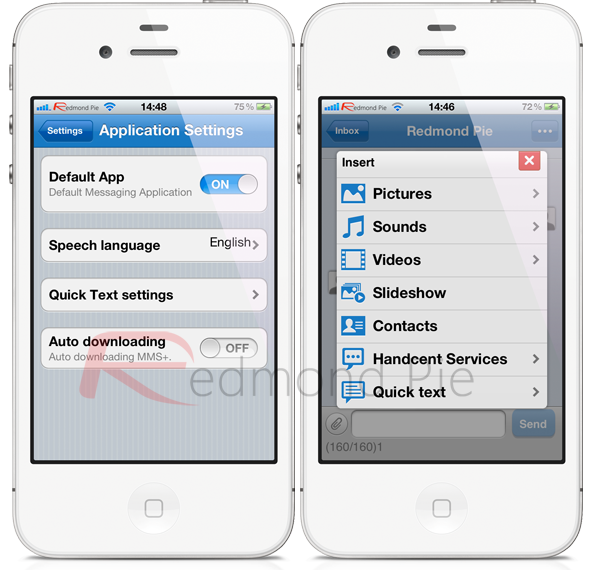
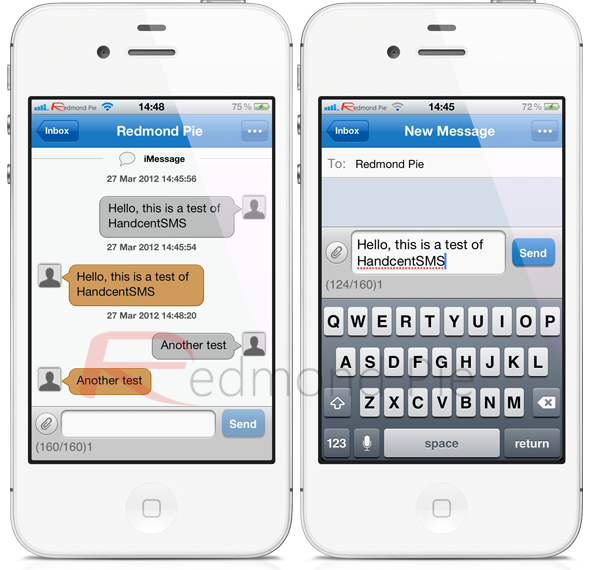
The lack of Messages app alternatives on Cydia could be either due to the fact that biteSMS and others have pretty much covered all bases and are extremely functional, or it could have something to do with the amount of work involved in creating such an app. Whatever the reason, the guys over at Handcent haven’t been deterred and have released their HandcentSMS app through the Cydia store which they believe can unlock the messaging potential of a user’s iPhone. HandcentSMS is an entirely free, very powerful and highly customizable alternative to Apple’s native app which handles both SMS and MMS messaging services.
The download comes in at 3.5MB and essentially attempts to totally replace the messaging experience on the device, circumventing the need for the built-in offering. At the time of writing, version 1.0 has just been released, and ships with the following feature set:
  • Quick reply capabilities without the need to launch the full version of the app.
  • The ability to heavily customize the conversation list, which includes the incoming and outgoing fonts, background colors and text bubble styles.
  • Set ring tones and alerts on a per contact basis.
  • Hide or show message time stamps.
  • Enhanced MMS and slide show capabilities.
  • Message signatures and cross platform Emoji support.
  • Optional online account registration to integrate additional Handcent services such as e-cards.
  • Much, much more. 
HandcentSMS obviously comes with a large number of features which will undoubtedly prove popular with users, but there are a few issues. The app is clearly designed for those who want more from their texting experience, but everything seems a little thrown together. The animations when switching between views are very blocky, with new views appear rigidly and doesn’t have that smooth iOS feel to it. I also noticed an issue with contact names being displayed in the conversation list, that it would just display the number or the email address, even though there is a name assigned to it that is displayed correctly through the native Messages app.
The pop-up options are something that will appeal to many, but didn’t seem to work during my testing with every incoming message being intercepted by Apple’s Messages app, even though the HandcentSMS settings were set to use it as the default app.
HandcentSMS has the early makings of providing a very powerful experience to jailbroken users and hopefully the development team will iron out some of the bugs which at the minute are showstoppers for me. The app is available as a free of charge download from the BigBoss repository and compatible with all firmwares above iOS 3.2.
Of course, you will need to jailbreak your device to install this tweak. For jailbreaking the latest iOS 5.1 (tethered), follow the instructions posted here to jailbreak using Redsn0w, or here for Sn0wbreeze. For jailbreaking iPhone 4S and iPad 2, you can simply follow our step by step tutorial posted here to jailbreak iOS 5.0.1 using Absinthe on Windows or Mac. Those of you with an iPhone 4, 3GS, iPad 1, and iPod touches can use Redsn0w or Sn0wbreeze to untether jailbreak on iOS 5.0.1.
Be sure to check out our iPhone Apps Gallery and iPad Apps Gallery to explore more apps for your iPhone, iPad and iPod touch.
Harry Potter Series In ePub Format Officially Released For iOS, Android, Mac, Kindle And More

The Harry Potter franchise is one of the most popular of all time. What started off as a few books has spanned a lengthy series of feature films and merchandise, and although the wizardry is mainly focused towards youngsters, plenty of adults count themselves a part of the Potter-manic legion.
While the audiobooks have been on sale digitally and physically for years now, it has taken a long while for the series to become available to those who turn pages with a touch of a screen as opposed to the flicking of paper.
Similarly to The Beatles’ music – which spent much time in limbo before finally selling digitally some three years ago – fans are likely to rush en masse to make their purchases. J.K. Rowling’s online Pottermore Shop is selling each title in the widely-accepted ePub format, with prices between $8-$10 per book, while the entire series can be had for a fairly reasonable for $57.54.
The ePub files come independently of any DRM, and work with pretty much any eReader or tablet you could care to name, including most iOS and Android devices. As you may expect, there’s store-level support for Amazon’s highly-successful Kindle reader, as well as the similarly popular NOOK from Barnes & Noble. Rather interestingly, however, the eBooks are not available through Apple’s iBookstore – at least not yet.
As well as Amazon and Barnes & Noble, Rowling also teamed up with the Sony Reader (U.S. and Canada), and Google Play (U.S., Australia, Canada, the U.K.) for synchronized book downloading through the respective accounts of each store.
It’s unknown why Rowling has waited so long to release the books electronically, although pricing conflicts always tend to cause a delay in these situations. Usually, book stores want some form of exclusivity, which often affects consumer and artist alike, but since Rowling is selling through her own store as well, there’s little risk on this occasion.
Kindle users will need to create a Pottermore Shop account in order to complete their transaction. This simply involves sourcing the book at Amazon, selecting "Buy at Pottermore", which will, in turn, open up the Pottermore Shop.
It’s currently an English language-only affair, but expect French, Italian, German and Spanish to be added to the roster in the very near future.

Apple Hit With Another Lawsuit Citing False Siri Advertising

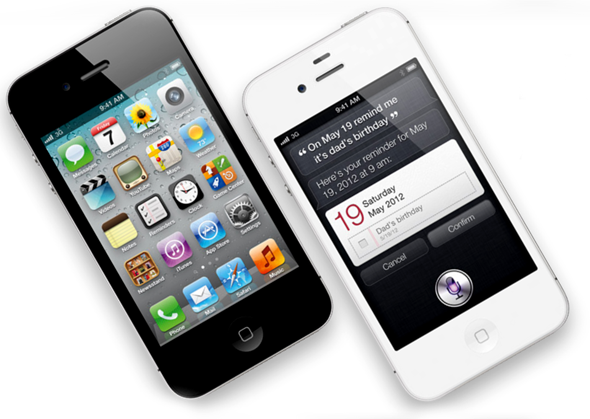
A couple of weeks back, Apple was dealt a lawsuit from a disgruntled New Yorker who claimed that the Siri voice-recognition software did not work as smoothly in reality as it appeared to on the advertisements.
In a week in which the fruit company has been in hot water regarding the misrepresentation of its products, iPhone 4S owner David Jones filed a suit on Tuesday, according to the LA Times. Apple’s new iPad – although 4G LTE compliant from a hardware point of view – has come under fire in countries such as Australia, where it is marketed as an "iPad 4G", despite none of the major carriers Down Under actually supporting 4G.

Similarly to the first class-action suit, Jones accuses Tim Cook’s company of falsely representing Siri’s capabilities:
Through its nationwide multimedia marketing campaign, Apple disseminates false and deceptive representations regarding the functionality of the Siri feature
Like the New York suit, lodged by Brooklyn resident Frank M Fazio, Jones’ complaint states grievances with the end product:
In many of Apple’s television commercials. . Apple depicts tasks as easily accomplished "just by asking" Siri. Apple’s deceptive commercials diverge greatly from the actual functionality and operation of the Siri feature.
In Jones’ case, "Siri would either not understand what Plaintiff asked, or, after a long wait, provided the wrong answer." He is currently seeking "relief and damages" for not only himself, but other iPhone 4S buyers.
As well as the uprising of iPad-related issues, this second suit comes just a day after Apple began paying compensation to iPhone 4 users affected by the Antennagate scandal of 2010. If you were among the early adopters of the landmark Retina device, then check out this link for more information on how you can retrieve either a $15 settlement, or a free bumper.

Most iPhone 4S adverts currently doing the rounds use Siri as the clinching feature, and although almost nine in every ten iPhone 4S owners consult Siri on a regular basis, reviews have certainly been mixed.
Lawsuits like this certainly won’t do the company’s PR any good, and although most of us can take Siri for what it is – a beta-stage implementation – such heavy marketing should maybe warrant a more finished article.
Thoughts?