মঙ্গলবার, ৮ মে, ২০১২

Apple Releases iOS 5.1.1 to Fix Bugs With HDR, AirPlay Video Playback and download this Firmware


Apple issued an update to its iOS operating system Monday, fixing a handful of minor bugs that have been affecting iPhones, iPads and iPod touch devices.
Apple says the new OS version, iOS 5.1.1, addresses five trouble spots:
  • Improves the reliability of the HDR photography option when shooting photos using the Lock Screen shortcut.
  • Addresses bugs that could prevent the new iPad from switching between 2G and 3G networks.
  • Fixes bugs affecting AirPlay video playback.
  • Provides improved reliability for syncing Safari bookmarks and Reading List.
  • Fixes an issue where an “Unable to purchase” alert is displayed after successful purchase.
Apple introduced iOS 5 in October 2011 with the launch of the iPhone 4S, and then iOS 5.1 was released in late November. iOS 5.1 primarily addressed rampant battery drainage problems many users experienced after upgrading to iOS 5.
The free iOS 5.1.1 update is under 50MB (42.5 MB for my iPad, 47.3 on the iPhone), and you can access it by clicking the Software Update tab under General Settings.

download this  Firmware


iphone 4s


iphone 4

3gs

ipad 1

ipad 2

ipad 3


বৃহস্পতিবার, ২৬ এপ্রিল, ২০১২

Wave Alarm For iOS: Use Motion Gestures To Silence Or Snooze Alarms – Download Now

Of all the essential everyday uses our smartphones give us, the simplest – and perhaps, the most vital – is the alarm clock.
The App store is trawling with various alarm clock apps, most of which don’t bring anything new to the table. There are the rather pleasant "night stand" apps, which give a nice warm glow to a dark room, as well as those which present a collage of beautiful images and backdrops blended into one another. One can get alarm clocks with RSS feeds, weather, and news updates all on standby ready to ease those AM blues, but there’s always room for improvement.
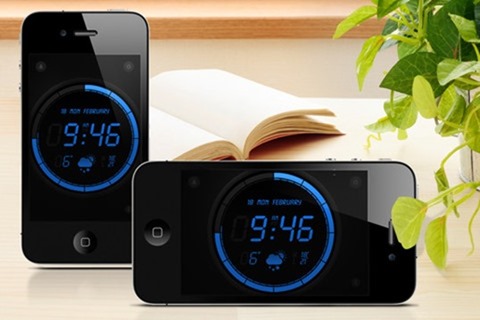
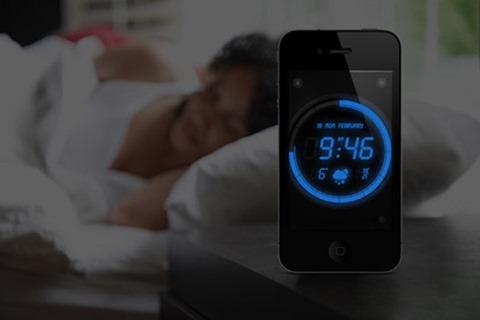
Wave Alarm by Augmented Minds changes the game a little – bringing a trump card over rivaling alarm clock apps. Unlike alternatives, which usually require you to slide in order to stop your alarm, Wave Alarm incorporates Motion Control technology, and as the name entails, you simply wave off your device in order to silence or snooze the alarm.
The description on the App Store states:
Utilizing Motion Control and detection, you never need to touch your phone again in the morning to turn off the alarm or to snooze, just wave your hand over the device when the alarm is sounding, and Wave Alarm will snooze or silence the alarm for you!
It’s an interesting take on just which type of alarm works best, although one suspects a wave is a rather easy way to fob your alarm off, before falling back to sleep. I’m inclined to think that the Math Alarm Cydia tweak is a more appropriate way to wake up – prompting the serial sleeper to solve a minor math problem before the noise can be stopped.


As well as the motion alarm, it’s also possible to have a normal alarm, and music from the device’s library can be used as the wake-up melody. As is the case with all iOS alarm apps (aside from stock), multitasking limitations mean Wave Alarm must be running in the foreground for it to work fully.
It works on all iDevices with front-facing cameras (required for motion detection). It’s free to download and try, but the full version costs $1.99 via in-app purchase.

Download Wave Alarm – Motion Control Alarm Clock for iPhone, iPad and iPod touch [App Store link]
Be sure to check out our iPhone Apps Gallery and iPad Apps Gallery to explore more apps for your iPhone, iPad and iPod touch.

RPon CardSwitcher Updated To v2.0 With Support For iOS 5 And iPad, New Features, And More

If you ever decided to take the time to sit and sift through the hundreds and thousands of packages that live within the default repositories in Cydia, I would imagine you would need to set aside a fair portion of your week in order to get through them all. With that said, even if you managed to sort through the packages, you only come out with a handful of tweaks or extensions that would be classed as essential installations for your jailbroken iOS device.
My own personal Cydia account is rammed full of purchases that I have made in the last few years, with the majority of the purchases being small tweaks designed to alter a tiny part of iOS, or something that I just thought looked good at that time. After using the extensions for a few days, the truth is that most of the purchases haven’t been used since and although they are available for me to download; I choose not to as they are what I would class as flash in the pan tweaks. Opinions may differ on this topic, but I tend to find that for my uses, only a handful of Cydia-based packages would fall under the essential category.
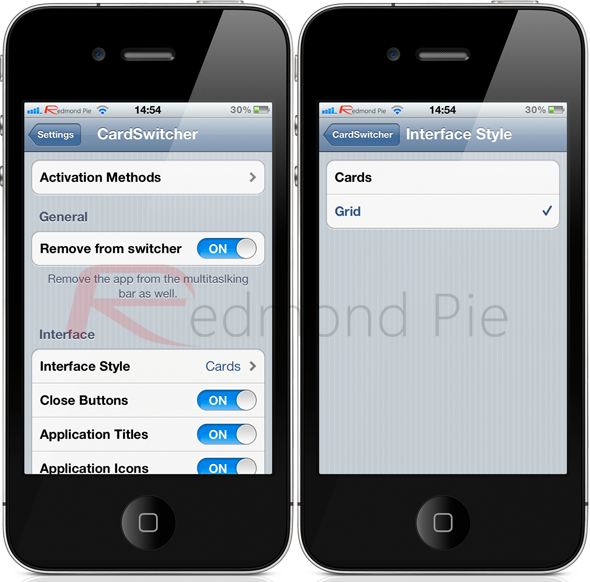
A tweak known as CardSwitcher has been around for quite some time, has received a lot of attention and may be familiar to some of you. Due to the fact it kind of offers the same functionality as the Multifl0w tweak, it has previously been overlooked, as people opt for the software associated with Aaron Ash’s name who has gained popularity with his Barrel extension. The developer of CardSwitcher has spent the last few months rewriting and re-imagining his work to bring it up to date and make it fully compatible with devices running iOS 5. Version 2.0 has recently been released onto the BigBoss repository with the following changes:
  • Live application views.
  • Refined swipe gestures.
  • New grid mode, designed primarily for the larger screen of the iPad but still works without issue on the iPhone and iPod touch.
  • Vastly improved performance and memory usage.
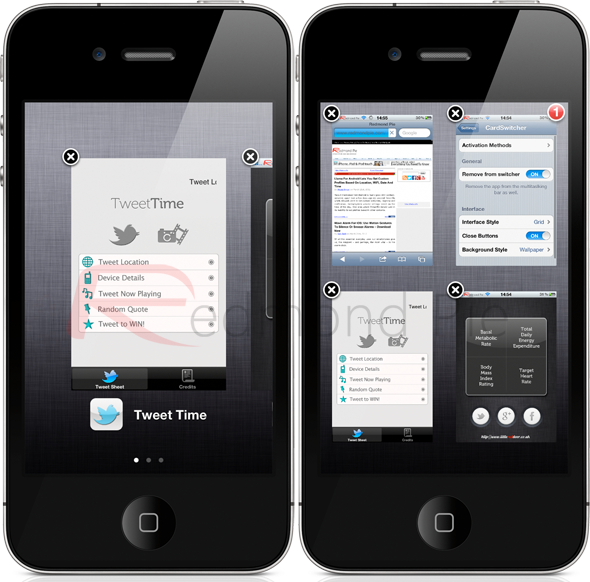
The latest version brings an impressive array of improvements, but what about the underlying core functionality of CardSwitcher? Well, the tweak itself can essentially be classified as one that reworks the way multitasking is handled on the device, bringing a visual interface very similar to the now defunct webOS. When the multitasking experience is invoked, either through the standard iOS method or by setting your own through Activator, the native switcher tray is replaced by either a tiled or grid view depending on which is active through the tweak’s settings bundle. The new view allows all backgrounded applications to be seamlessly swiped through and either brought to life again, or removed from multitasking altogether by either pressing the familiar red delete option or using a vertical swipe.
One of the most beautiful parts of the tweak is the inclusion of the live app tiles. Unlike other tweaks of a similar nature which simply display a static image, CardSwitcher shows a live view of the application including any outstanding badged notifications if relevant. Although the CardSwitcher tweak has been rewritten for iOS 5 support, it also features backwards compatibility with every firmware version from iOS 4 to the latest, which is 5.1, which should be enough to cater for all jailbreak needs.
For me, the CardSwitcher tweak essentially takes something that wasn’t broke and fixes it. Native iOS multitasking isn’t something that is in dire need of a makeover and it exists for a purpose and serves that purpose quite well. However, CardSwitcher manages to make the whole multitasking experience for a more, intuitive and extremely visually appealing with a set of stunning animations. The tweak is available on the BigBoss repository at a cost of $1.99 and is available for all iOS devices running iOS 4 and above.
Of course, you will need to jailbreak your device to install this tweak. For jailbreaking the latest iOS 5.1 (tethered), follow the instructions posted here to jailbreak using Redsn0w, or here for Sn0wbreeze. For jailbreaking iPhone 4S and iPad 2, you can simply follow our step by step tutorial posted here to jailbreak iOS 5.0.1 using Absinthe on Windows or Mac. Those of you with an iPhone 4, 3GS, iPad 1, and iPod touches can use Redsn0w or Sn0wbreeze to untether jailbreak on iOS 5.0.1.
Be sure to check out our iPhone Apps Gallery and iPad Apps Gallery to explore more apps for your iPhone, iPad and iPod touch.

Use Your iPhone Or iPad As A Wireless USB Thumb Drive With AirDisk Pro For iOS – Download Now

If there is one thing that owners of Android phones laud over their iPhone owning friends, it’s the ability to use their handsets as external storage for their computers. Plug an Android phone into a computer, flick a switch and the device appears just as if it was a thumb drive.
With phones now sporting up to 64GB of storage, such a feature is more useful than you may think. Need to get a large video file to a friend’s house and don’t want to wait hours for it to upload over the internet? Need to get business files to work quickly and easily but don’t have a USB drive to hand? That’s where you smartphone could prove invaluable.
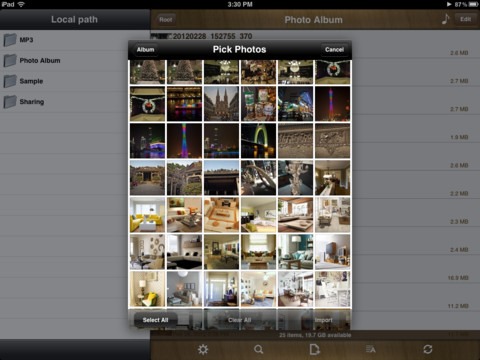
While the iPhone doesn’t offer such functionality out of the box, there are apps that try to fill the void left by Apple’s reluctance to give users access to their iPhone’s storage, and one such app is AirDisk Pro.

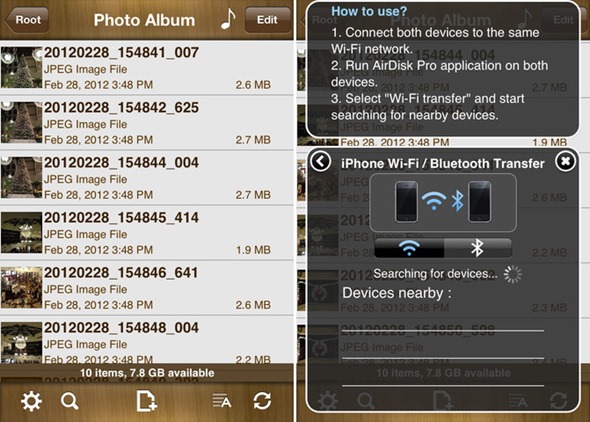
Retailing for less than a dollar in Apple’s App Store, AirDisk Pro allows users to keep files on their iPhones and then pull them off using just a web browser. Granted the iPhone needs to be on the same Wi-Fi network as the computer, but that’s better than nothing, and you could always turn your iPhone into its own Wi-Fi router with Personal Hotspot!
The app itself works by turning your iPhone into a file server which can be accessed via a computer and a web browser. Point the browser at your iPhone’s IP address and Robert’s your Father’s brother. You can upload and download files on a whim, and all for less than a buck.

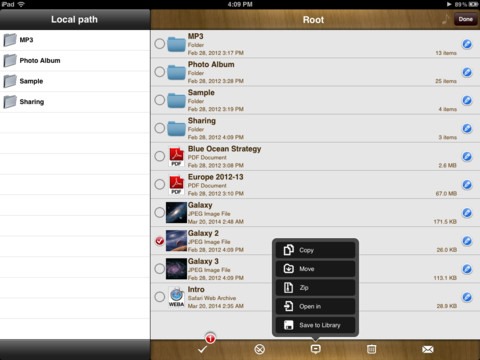
AirDisk Pro also supports unzipping files, as well as viewing documents and playing multimedia in-app. Support for text editing is also there, along with the option to password protect the whole shebang should you be the cautious type.
AirDisk Pro fills a void left by Apple and, should you have a need for it, is a real bargain at the price. If you’ve ever found yourself wishing you had a thumb drive in your pocket for transferring files then this may well be the app for you
Download AirDisk Pro for iPhone and iPad [iTunes link]
You may also like to check out:
Be sure to check out our iPhone Apps Gallery and iPad Apps Gallery to explore more apps for your iPhone, iPad and iPod touch.

Report: Next iPhone To Feature 4.6-inch Retina Display?

We could probably create a ‘law’ – along the lines of Godwin’s law or Murphy’s law – that states that with every iPhone release, there will be multiple rumors about it being designed with a larger screen. Of course, the upcoming, next-generation iPhone is no exception. Reuters has covered a rumor stemming from South Korean publication the Maeil Business Newspaper, which states that the next iPhone will have a 4.6" Retina Display screen.
While Apple’s rival phone manufacturers have all adopted larger screen sizes, Apple have remained firm in maintaining the 3.5 inch screen size throughout every single iPhone release since the inception of the device in 2007. In response to some debate and rumor that had taken place surrounding the release of the iPhone 5, blogger Dustin Curtis wrote a pretty magnificent post explaining the likely design decisions behind the iPhone’s retained and notorious screen size.

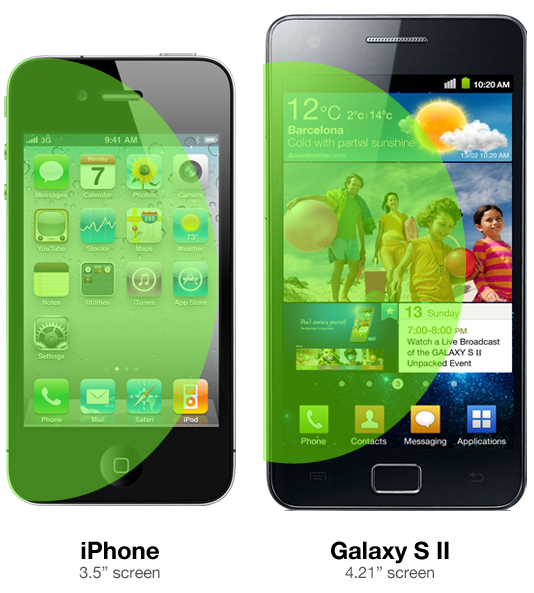
Basically, the reason behind it is so that it’s easy for most people to move their thumbs to each part of the screen with ease. This is something that becomes increasingly harder or uncomfortable to do on devices with a larger screen, such as the Galaxy S II. As you can see in the above image, Curtis produced a rendering that depicts a sort of comfortable "thumb radius", showing parts of the Galaxy S II that are out of reach.
To quote:
I pulled out my iPhone 4 to do a quick test, and it turns out that when you hold the iPhone in your left hand and articulate your thumb, you can reach almost exactly to the other side of the screen. [...] It is almost impossible to do this on the Galaxy S II.
In my opinion, a larger screen is more of an advertising gimmick. People often think that bigger is better – especially people who may wish to watch movies on their phone – but to me, it is more of a usability impairment than a positive design choice. Nevertheless, as there are constantly rumors of new iPad screen sizes, the dead horse section of the Apple rumor mill will continue unleashing these rumors of Apple increasing the screen size of its next-generation iPhone, even after the next iteration of the device has a 3.5" screen.
 So the verdict? This rumor is highly unlikely. Should Apple create an iPhone with such an enormous screen, pigs will fly and hell will freeze over. And, in an even more unlikely twist, they’d create a smaller iPad.

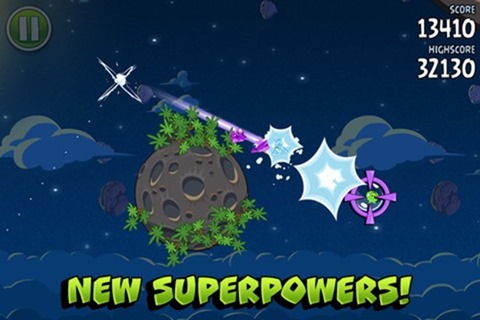
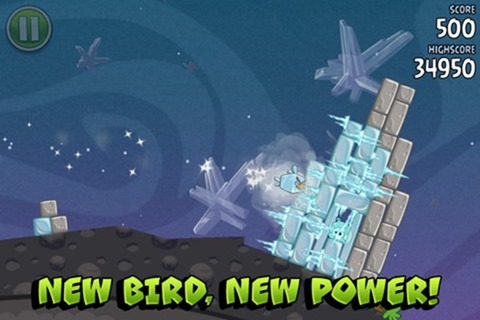
Angry Birds Space For iOS, Android, PC & Mac Now Available For Download!

Angry Birds has been to iOS and Android what Call Of Duty has been to consoles over the the last few years. Those crazy, unstoppable birds have flown as far as PC, Mac, Facebook and Google Chrome in their never-ending quest to defend the nest.
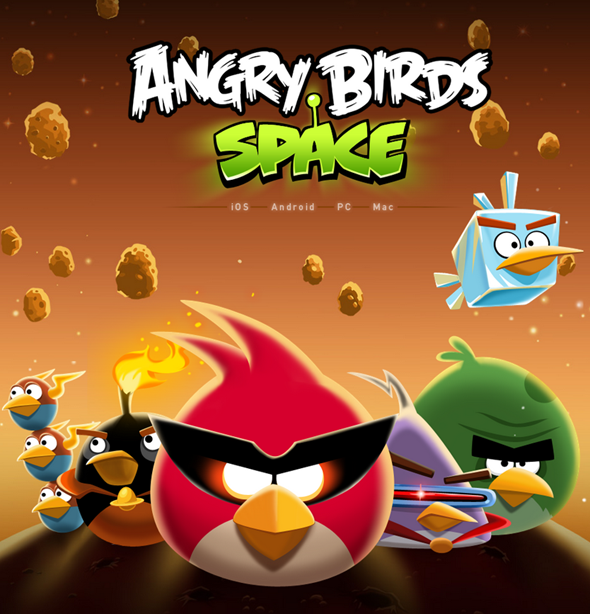
With three versions already on the market, Rovio has added a fourth edition to Angry Birds Rio, Angry Birds Seasons and the original version. First previewed earlier this month, Angry Birds Space takes things quite literally to another dimension. The initial trailer featured International Space Station rep Don Pettit, and was actually filmed in a spaceship, with Pettit test-firing plush toy versions of the fluffy birds at zero gravity.
With Angry Birds now being one of the most lucrative franchises in the industry, the release of Angry Birds Space is simultaneous on a variety of platforms. There’s an iPhone, iPad, Android, Mac, and Windows iteration for you to enjoy – all of which are linked to at the bottom of this post.
iOS, and subsequently, Android, have sparked a huge wave of physics-based games, which combine simple concepts with increasing challenges to leave consumers hooked, and the original Angry Birds is arguably credited with sparking the initial interest.
Angry Birds Space incorporates some of the physics we’ve already seen, but as you’d expect from outer space, the game contains planets with their own gravitational agendas – keeping things interesting. Up until now, the series could be accused of being rather same – with levels, birds, and their respective powers not variant enough to differentiate each title.
If you’re an Angry Birds addict (and there are plenty of you out there), you can download Angry Birds Space via the download links below. Those wielding the smartphone-come-tablet that is the Samsung Galaxy Note can enjoy exclusive content including a branded level, a 30-level DLC pack for free, and the coveted new Lazer bird.
Feel free to let us know if the new game lives up to your expectations, by dropping a comment on our Facebook or Google+ pages!
Check out our iPhone Apps Gallery and iPad Apps Gallery to explore more apps for your iPhone and iPad and our Android Apps gallery to explore more apps for your Android device.


China Now Sees More iOS And Android Activations Than United States

You only need to stop for a second and have a look at the number of smartphone devices and tablets available in the marketplace to understand just how popular mobile devices are becoming in our everyday lives. For seasoned users of these devices, the ownership decision generally isn’t a difficult one as they tend to have their preferred manufacturers and preferred OSes and will only deviate if something exceptional enters the public domain. However, for those who may be new to the smartphone or tablet ownership, the decision about what device or OS to opt for can be somewhat overwhelming.
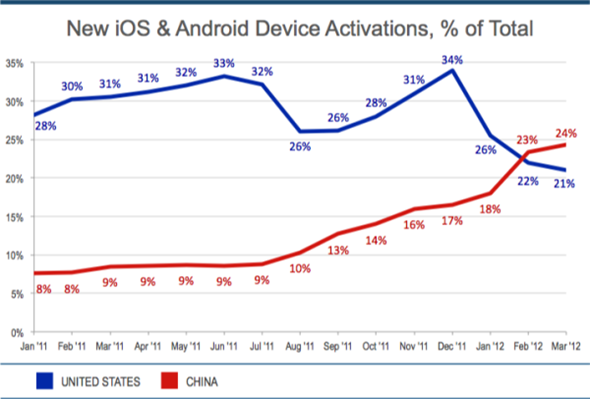
If the figures from a recent Flurry market research session are anything to go by, it would seem that the number of device activations across the iOS and Android platforms are rising at a rapid rate, indicating an increasing worldwide adoption of smartphones and tablets. At the back end of last year we were treated to some interesting insight into the fact that China had shot past the United States in Q3 of 2011 when it came to total volume of smartphone shipments, growing by 58% from the previous quarter. During the same period, the volume of devices shipped in the United States fell by 7% leveling out at a total of 23 million units.
The latest research shows that the Chinese market is continuing to grow and has now surpassed the United States, and in fact the rest of the world, when it comes to Android and iOS device activations. In the last fifteen months alone; China has reportedly gained 16% of the world’s smartphone and tablet market, rising from 8% at the beginning of 2011 and tipped to rest at a staggering 24% by the end of the current calendar month. When making a direct comparison, the United States dropped from having a 28% share of new activations down to an approximate 21% during the same tracked period.


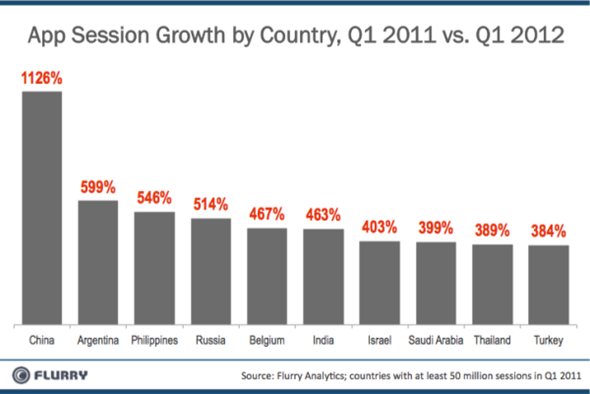
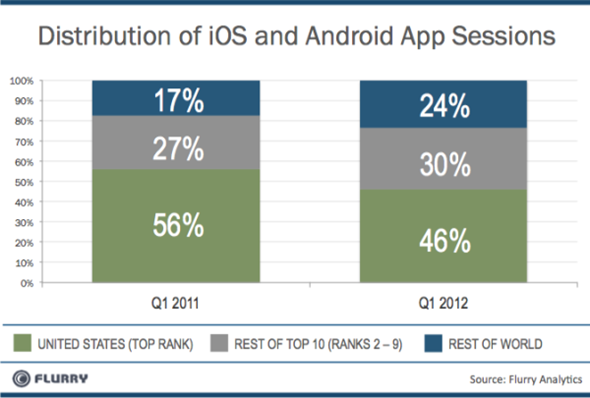
The researched figures would seem to confirm that the philosophy of technology companies paying more attention to and investing more resources into the Chinese market is a very sensible move as it looks like the Chinese population is becoming richer. The fact that China also has the largest app session growth over the last twelve months indicates that now is the perfect time for app developers to start appealing to the Chinese market, taking advantage of the Eastern boom.
You may also like to check out: